
The new Apple TV (now with Apps!)
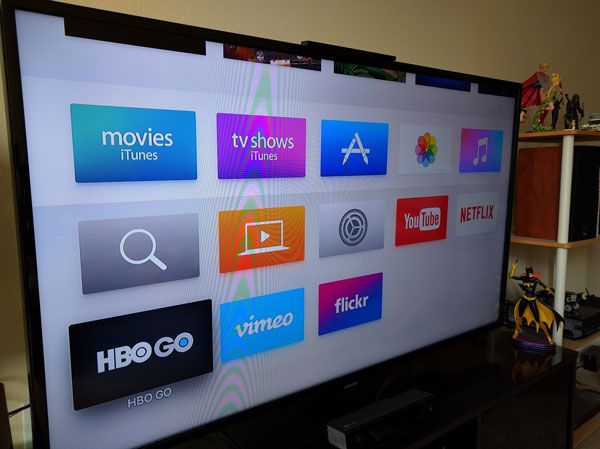
The new Apple TV has just been release and as a daily user of the previous model I was curious about this new version, especially in regards to the new remote. Other new features include Apps, a snazzy new UI, Siri integration, more storage space, and a faster processor.
How I use my Apple TV
I primarily use my Apple TV to watch television shows I purchase through iTunes. I purchase season passes for the shows I like and am able to watch them generally the day after their air. This has proven extremely convenient, I get to watch the shows without advertisements and I own the season at the end of the day.
Before coming to the United States I would download these shows via iTunes on a Mac and access the shows via the 'Computers' app on the previous Apple TV. Now that my Internet speed has significantly improved I am able to stream HD TV shows and movies from iTunes directly and have been able to make greater use of the built-in TV shows app.
I also watch movies through the iTunes Movies app.
I use Netflix and HBO Go occasionally. Usually to watch specific content, like Daredevil or Game of Thrones.
I also use YouTube regularly and I am subscribed to a number of 'channels'.
Initial Setup
The initial setup looked promising, suggesting that an iOS device could be used to help perform the initial configuration. Unfortunately when it prompted for my iTunes password I was unable to provide that immediately so I skipped that step. There did not seem to be a way to repeat the setup, so I reset the device but could not get the iOS setup to work again. This sadly meant that I needed to enter my rather complicated iTunes password using the remote, which was not fun.
The Apple TV also asks for the password when making purchases by default, so you may want to turn this off in the settings. Oddly it did not ask me for my password when I changed this setting. I was thankful for this at the time, but more investigation may be needed to work out whether it allowed this because of the recency of my password entry. It is disappointing that it did not permit for a pin to be set for purchases. Fortunately I live alone, so I'm not concerned about house members racking up expenses on my iTunes account, but for parents this could prove troublesome.
The Remote
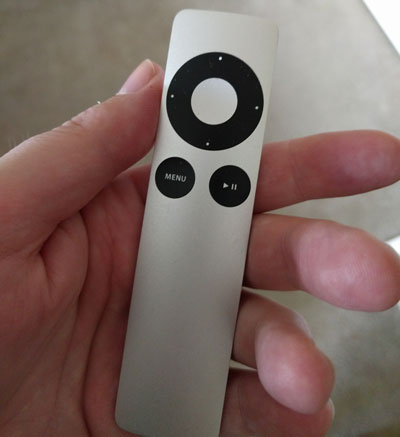
I really liked the original remote. It was simple, slim, and I used every single button regularly. Nothing about this remote was superfluous. The slim design also made it perfect for slipping snuggly into the arms of my chair so I always knew where I could find it (assuming I remembered to put it there).
I have never replaced the battery on my original remote. I did buy some spare batteries, but have never really needed them. The buttons had a good degree of push to them and felt extremely comfortable.
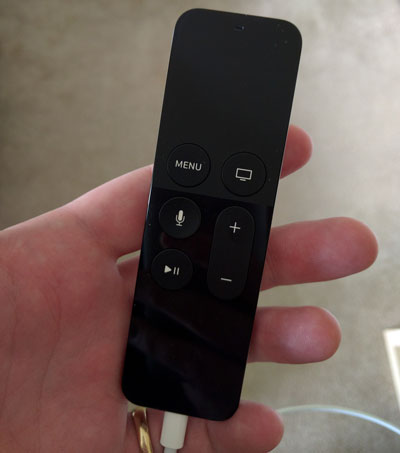
The new remote is about the same length as the old remote, although slightly wider. The aluminium back and general design is what you would expect from an Apple product. The top portion is a touch screen and like Apple's laptop touch pads, clicking does entail physically pressing the surface past a resistance point. A simple touch will not work.
The touch pad replaces the directional control and although it is significantly easier to overshoot than with the previous control it is responsive and an excellent way to skip back and forward through video content. It is extremely easy to get accidental swipes of the touchpad surface, so for uninterrupted viewing you will need to place the remote somewhere it won't inadvertently be touched.
The menu button works much as it always has, although with an emphasis on Apps the reality that it is really a back button is hard to miss.
The home button (the one with the picture of a TV) is a new and welcome addition. This will get you back to the home screen with a single button press. If you've ever found yourself deep in a Netflix session you'll recognise how valuable this little button is. An arguably hidden feature of this button is that you can double tap it to switch between your currently open apps. I find this especially useful when switching between YouTube and iTunes TV shows as I can skip the home screen entirely. The app switching is definitely an area where things start to go wonky. Because the navigation is controlling the active selection, swiping left will make the content move right and vice versa. Like iOS you can swipe up to close an App.
Holding down the home button will allow you to put the Apple TV to sleep. The previous Apple TV required going through a series of menus in settings to do this, so I never did and just let it go to sleep automatically. This is a massive improvement. It also seems to turn off my TV as well, which is just awesome.
The microphone button allows you to interact with Siri. I'll talk about Siri a little later.
The play/pause button is much the same.
The plus/minus buttons are designed to control the volume. After configuring HDMI control on my Yamaha receiver I was able to take advantage of this, although it doesn't adjust the volume quite as quickly as the dedicated remote.
One definite advantage that the new remote provides is the use of Bluetooth to interact with the Apple TV. This means you don't need to point it at the Apple TV box and could even have the Apple TV box completely hidden away. It also increases the responsiveness of the remote, making interactions snappier.
One of the oddities of the new remote is that it is now charged with a lightning cable. The extra juice required by maintaining a Bluetooth connection would surely drain a traditional battery. The packaging comes with the cable, but does not come with a wall adapter, so be prepared to find a spare USB power port somewhere. I have a couple of Anker USB PowerPorts lying around (they are great for travelling), so this wasn't a huge deal for me, just disappointing. The Apple TV itself doesn't have a traditional USB port either, so don't expect to piggy back on the Apple TV's power.
The status of the battery is also something of a mystery. I have seen the Apple TV show that the remote is charging when it is not. I have no idea what the battery level is, and I certainly don't want to start a viewing session and find that the battery is empty. There is also no indication on the remote itself when it is charging or whether it has been fully charged. A simple orange/green LED would have sorted this out and certainly reduced battery anxiety.
Watching Television
The software is the main area that has let me down with the Apple TV. I expect that most (if not all) of these issues will be addressed in upcoming software updates, but this is certainly not a good start and feels like a step back from the previous Apple TV.
The first thing that I noticed was that the 'Recent Purchases' section of the iTunes store had significantly changed its meaning. The previous generation Apple TV would include television shows that had new episodes in this category, allowing me to easily find my new content. Now this is based entirely on the original purchase date. Consequently a couple of binge purchases that I have made now sit in this area, leaving my new content mostly hidden in the haystack of the rest of my purchases.
This is a definite step backwards for anyone who purchases a number of television shows in advance and wants to keep up to date. Now I have to hunt for new episodes.
Upon opening a show you are taken to a stylish screen showing some details about the show and a button to play the next episode. This looks like a good start, but has a few kinks to be worked out:
- Only the episode number is displayed (not even the season)
- The synopsis for the latest season is displayed, which isn't necessarily correlated to the next episode
- Special Features are counted as episodes. I don't generally watch the special features, so they interfere with showing me the latest episode
- The list of episodes displayed below (horizontally) starts from the earliest season purchased. I had to scroll right to the end to get the latest episode
- Sometimes the latest episode isn't shown and you need to go to the iTunes store listing to play it from there instead. Admittedly this used to happen occasionally with the previous Apple TV, but it looks like this problem has come back.
I really hope that the extra love given to the Apple TV now will see massive improvements in this area. Separation of special features from episodes would be a good start and improved mechanisms for seeing what to watch next. They have definitely made improvements recently in synchronising the watched status. I watched a number of shows recently on my iPad and their status was updated correctly. I even watched most of the shows while in Airplane mode. Everything just worked.
There seems to also be a noticeable delay now when opening the details for a show.
Watching Movies
Watching movies is generally a simpler experience and this works as expected. This is generally unchanged from the previous iTunes version and movies with iTunes extras function as you would expect.
Apps
The new Apple TV is pretty bare bones when you start, unlike the previous version which seemed to constantly have new apps appearing on the home screen. Fortunately this means you can have just the apps you want to use which gives it a much more personal feel than the generic 'channels' presented by the previous Apple TV.
Interestingly Safari isn't among the list of apps available. So many other TV devices want to bring the web directly to your television. Most of the time this is a horrible experience. Websites are simply not designed for the limited controls we tend to use with our televisions. Instead by pushing users towards apps a custom experience can be delivered. Hopefully we will begin to see more video providers develop apps for this platform.
Games are among the apps available, but I don't find myself particularly interested in playing games with the remote control.
YouTube
The YouTube app is probably my most frequently used app and now thanks to YouTube Red I am able to enjoy an advertisement free YouTube experience once again. YouTube also provides an avenue to access videos purchased through Google Play, so you aren't confined to iTunes for purchasing movies and television.
Being able to turn off auto-play was definitely a good thing to see from this updated app, allowing me to more easily watch individual videos.
One feature that does seem to be lacking is the ability to interact with the videos by favoiting, liking, or disliking. On the information page for videos it suggests going to the website to report content, but I'd like to see some of this functionality surface. I can do without annotations and comments, but I miss the ability to like videos.
Fortunately setting up YouTube to connect to your account is easy and does not require entering your password.
Netflix
The Netflix app certainly looks improved on previous versions, although I haven't yet watched any content through it. Netflix requires you set up with your username and password, which is time consuming and frustrating. Hopefully this is something they can work on rectifying.
HBO Go
This app is probably the fanciest looking of the newly available apps. It is clear that HBO is starting to put some effort into making this experience good and not simply a platform for catching up on episodes missed from their original broadcast time. Traditionally this app has lacked good tracking of what you have and haven't watched and what episode you are up to. I haven't used this app much yet, but I imagine these haven't improved yet but are no doubt on the horizon.
HBO Go allows activation via a code you enter on a website, so setting it up is generally straightforward
Vimeo
I have a friend who uses Vimeo to upload his videos so I decided to set up an account and connect the app. This app lets you connect with a simple code so I was up and running pretty quickly. One disappointing aspect of Vimeo which isn't limited to this particular app is that it insists on showing me a bunch of other content that I don't especially care about with my friend's content interspersed. I'm not quite sure how to get around this, but I know that once I find a video my friend made I can easily navigate to his other videos.
Flickr
To be honest I've mostly forgotten about Flickr, but I was curious to see this app as it was the only one besides iCloud Photos that focussed on simple images. If this app proves useful I will return to storing photos on Flickr so that I can easily view them on my television.
Siri
Siri is a mildly useful feature, especially in its ability to bring content from multiple sources. This means I can search for something and realise it is available on Netflix or HBO Go and not necessarily just purchase it on iTunes. This is an interesting addition and is definitely in the best interest of the consumer. It's voice recognition remains pretty good and with the microphone placed in the remote control there is no fiddling around to get it to work. Requests like "Show me the latest episode of Doctor Who" will be recognised and might help overcome some of the current shortcomings in the regular UI.
Screensaver
The screensaver has changed to some beautiful aerial video and promises regular updates. This screensaver comes at a cost of about 600MB a month.
Conclusions
One of my biggest concerns when the new Apple TV was announced was that the previous generation Apple TV would be actively sabotaged to coax users to the new model. I hope this is just paranoia. As it works today I cannot recommend the new Apple TV to users with an existing Apple TV. Unless one of the new features is really compelling to you, it just isn't worth it.
As I've said I'm hoping that the issues will be fixed soon as they are largely software related. I expect that we'll see some apps released in the future that will make that aspect of the device more compelling as well.